

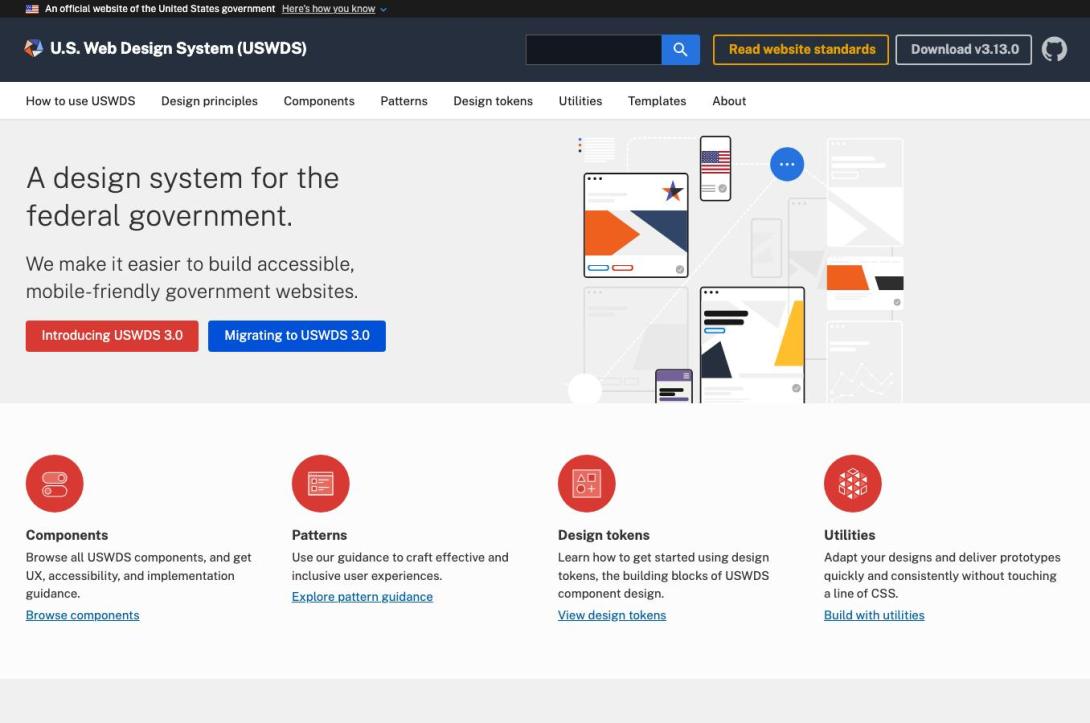
 United States Web Design System
USWDS Base on Drupal.org is a Drupal contributed theme that provides a deliberately minimal integration between Drupal and the U.S. Web Design System (USWDS). Its central philosophy is quite different from a conventional feature-rich Drupal theme: rather than attempting to become a complete frontend framework, uswds_base primarily prepares Drupal's markup and templates so that they work naturally with USWDS.
That distinction is important. The project is not intended to give a site a complete visual identity out of the box. Instead, it gives developers a relatively clean foundation on which to build a custom Drupal frontend using the USWDS design system.
As of the current Drupal.org project information, the theme reports 1,753 sites, is covered by Drupal's security advisory policy, and its current stable release is 3.12.1, compatible with Drupal 10 and Drupal 11. (Drupal.org)
What exactly is USWDS Base?
The United States Web Design System is a government-oriented design system maintained for building accessible, consistent, mobile-friendly digital services. It provides design tokens, components, CSS, JavaScript, typography, layouts, accessibility patterns and other frontend building blocks.
uswds_base acts as a bridge between that design system and Drupal.
The project explicitly describes itself as a base theme utilizing USWDS, but its implementation is intentionally restrained. The maintainers state that the primary theme does not add its own substantial CSS or JavaScript; instead, Drupal-specific markup receives the classes and structural treatment necessary to work with USWDS. (Drupal.org)
This makes the theme particularly interesting for organizations that want:
- Drupal as the CMS;
- USWDS as the frontend design system;
- a custom subtheme;
- control over the site's CSS and JavaScript;
- minimal coupling between Drupal and a particular visual implementation.
In other words, USWDS Base is more of a Drupal/USWDS integration layer than a finished website theme.
The philosophy: deliberately minimal
This is probably the project's greatest strength.
The maintainers explicitly say:
"No CSS or JS will be added to this theme."
The intention is to keep the theme's settings and code to a minimum and let the site developer handle project-specific styling in a subtheme. (Drupal.org)
That has several consequences.
Advantages
A developer doesn't inherit a large collection of opinionated styles.
You can decide:
- which USWDS components to use;
- how the colors should be configured;
- how typography should work;
- which layouts should be used;
- how much JavaScript should be loaded;
- how the header and footer should be structured;
- how Drupal-specific components should look.
This is much cleaner architecturally than modifying a large general-purpose Drupal theme until it happens to resemble USWDS.
Disadvantage
A beginner may install uswds_base, activate it and wonder why the result doesn't look like a polished government website.
That is intentional.
The theme expects you to build a subtheme and integrate the USWDS assets rather than treating the base theme as a complete frontend product.
Drupal 10 and Drupal 11 compatibility
This is one of the strongest aspects of the project today.
The current stable release, 3.12.1, supports:
Drupal
^10 || ^11
and was released in May 2026. The release specifically includes a fix for a missing-variable issue affecting Drupal 11. (Drupal.org)
The project's history also shows that Drupal 11 compatibility was introduced in the 3.8.x series, followed by subsequent fixes for Drupal 11. (Drupal.org)
For a new Drupal 11 project, that makes uswds_base considerably more attractive than an older USWDS implementation that has not been actively maintained.
USWDS version management is unusually sensible
One of the most interesting architectural decisions is that the Drupal theme and the USWDS library are not required to move in lockstep forever.
The project currently lists compatibility with USWDS 3.13.0, while the latest stable Drupal theme release is 3.12.1. The maintainers explicitly explain that this mismatch is intentional. (Drupal.org)
Their philosophy is essentially:
Don't make developers wait for the Drupal theme to be released every time USWDS itself changes.
This is a very good approach for experienced Drupal developers.
The theme provides the Drupal integration layer while the actual USWDS library can be tested and upgraded independently.
That means an organization can potentially:
- install a known-good
uswds_base; - install a specific USWDS version;
- test a newer USWDS release;
- update the USWDS assets independently;
- only modify the Drupal theme if a structural incompatibility actually appears.
This is substantially better than treating every USWDS release as requiring a corresponding Drupal theme release.
The project nevertheless recommends testing new USWDS versions in the site's own environment before upgrading. (Drupal.org)
The subtheme model
For production use, I would strongly recommend creating a custom subtheme rather than modifying uswds_base directly.
The Drupal documentation describes the theme as a foundation and explicitly directs more complex project-specific theming into a custom theme. (Drupal.org)
A typical architecture would therefore look conceptually like:
Drupal
│
├── uswds_base
│   └── Drupal ↔ USWDS integration
│
└── my_uswds_theme
    ├── templates/
    ├── css/
    ├── js/
    ├── images/
    ├── libraries/
    └── USWDS configuration/assets
This is exactly the architecture I would recommend for a serious Drupal deployment.
It protects the upstream theme from local modifications and makes Composer-based updates much safer.
CDN: useful for testing, wrong for production
One aspect deserves particular attention.
After installation, the theme provides a default option for loading USWDS assets from a CDN. The documentation explicitly says this is intended to allow users to see the theme working quickly and should not be used for production. (Drupal.org)
That's a good development convenience but a poor production architecture.
For production, I would recommend:
Drupal
   ↓
Custom USWDS subtheme
   ↓
Locally managed USWDS assets
   ↓
Your web server/CDN
rather than:
Drupal
   ↓
External CDN
   ↓
Third-party USWDS assets
Local asset management gives you much greater control over:
- versioning;
- caching;
- CSP;
- availability;
- security review;
- reproducibility;
- deployment;
- performance;
- offline/staging environments.
It also makes a Composer/Git-based deployment much more deterministic.
Header and navigation
uswds_base provides configuration for different USWDS header approaches, including basic, extended and mega-menu configurations. The project documentation also covers the USWDS mega menu. (Drupal.org)
However, this is an area where Drupal developers need to understand the underlying Drupal menu system.
For example, the mega menu expects multiple menu levels. The documentation explains that the complete mega-menu implementation requires three levels, with the second level functioning as a column grouping and the third containing the actual links. (Drupal.org)
That means the USWDS Base implementation isn't simply:
"Turn on mega menu → everything works."
Your Drupal menu structure has to correspond to the expected USWDS structure.
This is reasonable, but it is something that should be designed before building the site's navigation.
Footer implementation
The same principle applies to the USWDS footer.
The theme provides options for different footer sizes, including:
- Small;
- Medium;
- Big;
- agency information.
The big footer uses Drupal menu hierarchy to generate its columns. (Drupal.org)
Again, this is a good Drupal-native approach because content editors can continue managing navigation through Drupal rather than editing HTML manually.
But the menu hierarchy becomes part of the frontend architecture.
Accessibility
USWDS itself has a strong accessibility-oriented philosophy, and this is one of the reasons the framework is attractive for government, educational, nonprofit and institutional websites.
However, an important distinction must be made:
Using USWDS Base does not automatically make a Drupal website accessible.
Accessibility still depends on:
- custom Twig templates;
- contributed modules;
- content;
- form configuration;
- JavaScript;
- custom components;
- color choices;
- heading structure;
- link text;
- images and alternative text;
- keyboard interaction.
The theme can provide a much stronger foundation, but developers remain responsible for the final implementation.
This is particularly important when creating custom components outside the standard USWDS patterns.
Customization
USWDS itself is designed for substantial customization through Sass and theme settings. The official USWDS documentation describes customization through files such as _uswds-theme.scss and custom styles. (GitHub)
That fits uswds_base extremely well.
A production implementation can therefore separate:
USWDS
The underlying design system.
uswds_base
Drupal integration.
Custom subtheme
Your organization's:
- colors;
- typography;
- logos;
- layout;
- templates;
- components;
- JavaScript;
- branding;
- custom CSS.
That separation is architecturally clean.
What it does NOT try to do
This is worth emphasizing.
uswds_base does not attempt to be:
- a complete Drupal distribution;
- a page-builder;
- a component library for every Drupal field;
- a replacement for Layout Builder;
- a complete design implementation;
- a full enterprise frontend framework;
- a turnkey government website.
That is not a weakness by itself.
In fact, for experienced Drupal teams it can be a major advantage.
The project deliberately avoids putting too much application-specific functionality into the base theme. (Drupal.org)
Comparison with the other Drupal USWDS project
There are two projects that can easily be confused:
uswds_baseuswds
The distinction is important.
The official USWDS Drupal ecosystem description explicitly characterizes uswds_base as the minimal approach, while the other USWDS Drupal project focuses more heavily on modifying Drupal markup for USWDS and provides additional functionality. (Drupal.org)
The uswds project also documents an example subtheme and additional integration possibilities. (Drupal.org)
A simplified comparison:
| Feature | USWDS Base | USWDS |
| Philosophy | Minimal | More integrated |
| Drupal base-theme dependency | Minimal/no Core base theme | More traditional base-theme approach |
| Extra CSS/JS in primary theme | Very little | More integration-oriented |
| Control | Very high | High |
| Complexity | Lower | Higher |
| Best for | Custom Drupal implementations | More opinionated USWDS integration |
| Learning curve | Moderate | Moderate–high |
| Developer ownership | High | Moderate–high |
The USWDS project's own ecosystem documentation identifies this minimal-vs-more-integrated distinction. (GitHub)
Ecosystem and extensions
The base theme can also be combined with other USWDS-oriented Drupal projects.
For example, the Drupal USWDS ecosystem includes integrations for:
- CKEditor;
- Paragraph components;
- UI Suite USWDS;
- additional USWDS-centric components. (Drupal.org)
This is important because the base theme intentionally doesn't attempt to solve every problem.
You can keep the base theme small and add functionality only where your project needs it.
That is preferable to installing a huge theme containing functionality you never use.
Maintenance status
This is another strong point.
The project was created in 2019 and was updated as recently as September 24, 2026. Drupal.org currently reports 1,753 sites using it, and stable releases are covered by Drupal's security advisory policy. (Drupal.org)
The current stable version is:
3.12.1
with:
Drupal: ^10 || ^11and Composer installation:
composer require 'drupal/uswds_base:^3.12'For a Drupal 11 project in 2026, this is a meaningful advantage.
Performance
The minimalist approach should generally be favorable from a performance perspective.
The theme isn't trying to ship a giant collection of unrelated components, JavaScript frameworks and theme-specific assets.
The project explicitly states that it doesn't add its own general CSS or JavaScript and instead leaves that responsibility to the subtheme. (Drupal.org)
That makes it possible to build a relatively lean frontend.
However, actual performance depends heavily on how you integrate USWDS.
A poorly configured implementation can still become heavy if it:
- ships unnecessary USWDS assets;
- loads everything on every page;
- includes unnecessary JavaScript;
- uses unoptimized fonts;
- loads third-party CDN resources;
- creates excessive Drupal render/cache work.
So I would give the theme high performance potential, rather than claiming that it is automatically high-performance.
Security considerations
The project has an important advantage here: stable releases are covered by the Drupal Security Advisory Policy. (Drupal.org)
But the CDN recommendation deserves consideration from a security and operational perspective.
For a government, enterprise or institutional site, I would avoid relying on externally hosted production assets unless there is a specific reason to do so.
A controlled deployment should preferably pin:
Drupal version
+
uswds_base version
+
USWDS version
+
custom theme version
and test them together.
This produces a much more reproducible deployment.
Developer experience
For an experienced Drupal developer:
Very good.
For someone expecting:
Install → activate → finished website
Less good.
The project assumes that you understand:
- Drupal themes;
- Twig;
- libraries;
- Drupal menus;
- subthemes;
- CSS/Sass;
- asset management;
- Composer;
- frontend build processes.
That isn't a criticism. It reflects the project's purpose.
Potential weaknesses
1. It isn't turnkey
You have to build your own frontend implementation.
2. Documentation can feel fragmented
The documentation covers installation, menus, footer, hero examples and Drupal-specific fixes, but assembling everything into a modern production workflow still requires developer judgment. (Drupal.org)
3. USWDS knowledge is required
You aren't just learning Drupal theming; you're also learning USWDS.
4. Version independence requires testing
The ability to upgrade USWDS independently is excellent, but it transfers responsibility to the development team.
5. Menu architecture matters
Mega menus and large footers depend on Drupal's menu hierarchy, which can become complicated on large sites. (Drupal.org)
6. Custom components are your responsibility
If your organization needs components that aren't part of USWDS, you'll have to implement them yourself or add another integration layer.
Who should use USWDS Base?
I would strongly consider it for:
Government websites
This is obviously its strongest use case.
Universities
Especially institutional sites that need a formal, accessible and consistent design system.
Research institutions
Particularly where accessibility and long-term maintainability are important.
Nonprofits
Organizations wanting a mature design system without purchasing or developing one from scratch.
Large Drupal installations
Especially where multiple sites need a common design language but individual teams need some autonomy.
Headless/decoupled-adjacent architectures
Potentially, although the theme itself is intended for Drupal's rendered frontend rather than being a headless framework.
Who probably shouldn't use it?
I would probably avoid it if:
- you need a finished theme immediately;
- your site doesn't need USWDS;
- your design is radically different from USWDS;
- your team doesn't want to maintain a custom frontend;
- you're looking for a page-builder-centric solution;
- you don't have frontend development resources.
In those situations, another Drupal theme or design system may be more appropriate.
My assessment
| Category | Rating |
| Drupal 11 compatibility | 9/10 |
| Architecture | 9.5/10 |
| Maintainability | 9/10 |
| Flexibility | 9.5/10 |
| Performance potential | 9/10 |
| Accessibility foundation | 9/10 |
| Documentation | 7.5/10 |
| Beginner friendliness | 6/10 |
| Out-of-box appearance | 6.5/10 |
| Production suitability | 9/10 |
| Long-term potential | 9/10 |
Overall: 9/10 for professional Drupal development
The high score isn't because uswds_base gives you the most features.
Quite the opposite.
It scores highly because it knows what it should not do.
Final verdict
USWDS Base is one of the more architecturally disciplined Drupal themes for organizations that actually want to use USWDS.
Its greatest strength is its restraint.
Instead of creating another large Drupal theme with its own visual language, CSS framework and JavaScript layer, it establishes a relatively thin connection between Drupal's rendering system and the USWDS design system.
The project's current maintenance status is particularly encouraging: it supports Drupal 10 and 11, received updates in September 2026, has a stable security-covered release, and explicitly accommodates independent USWDS upgrades. (Drupal.org)
The correct way to approach it is therefore not:
"Install USWDS Base and use it as my finished theme."
but:
"Use USWDS Base as the Drupal foundation for my own USWDS-based design system."
That distinction makes a substantial difference.
For a Drupal 11 production site, I would choose the following architecture:
                    Drupal 11
                        │
                        ▼
                 uswds_base
                        │
                        ▼
              Custom USWDS Subtheme
                 │            │
                 ▼            ▼
             USWDS 3.x     Custom CSS/JS
                 │            │
                 └─────┬──────┘
                       ▼
                 Production UI
I would keep uswds_base unmodified, keep the USWDS library under controlled version management, create a custom subtheme, compile/customize USWDS there, and treat the entire frontend as an independently versioned application layer.
For someone already working seriously with Drupal 11, Composer and custom themes, that is a very strong foundation.
U.S. Web Design System
Official USWDS Base project page
USWDS Base documentation
Page Term Reference
Comments